

Quotes and invoicing
How to Send an Invoice by SMS
Learn how to send an Invoice by SMS in ServiceM8.
Send an Invoice by SMS Online
- Open the Job Card for which you would like to send an Invoice
- If you have already produced an Invoice PDF document for the job, find the invoice in the Job Diary and click on it to open the Invoice preview window.
- Otherwise, go to the Quotes & Invoicing tab and click Produce Invoice to generate an Invoice PDF. The Invoice preview window will automatically open once the invoice has been produced.
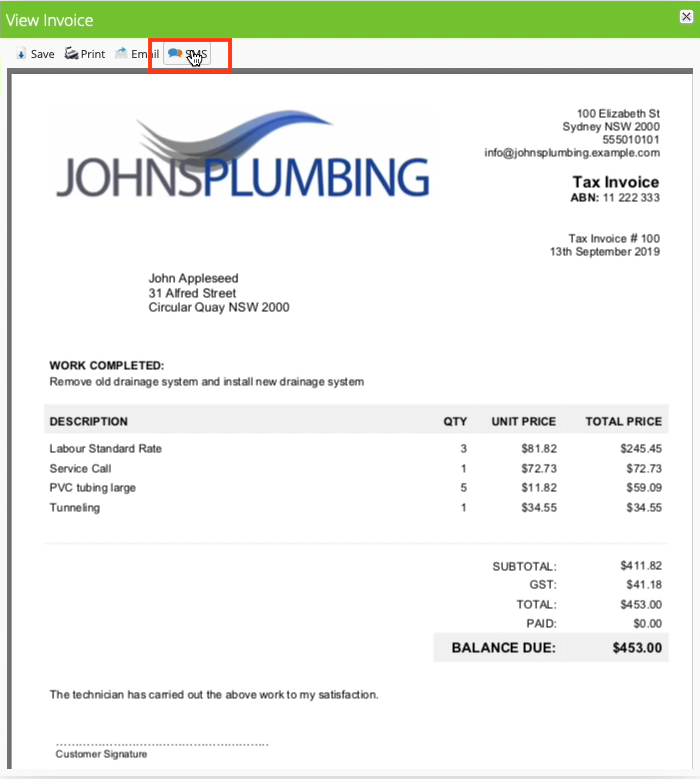
4. Tap the SMS button in the Invoice preview window. The SMS window opens, with a pre-filled message.
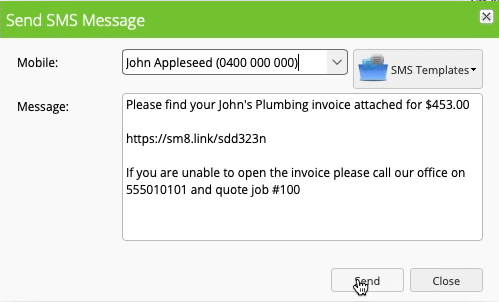
5. Adjust the message recipient or contents if required, then click Send to send the message.
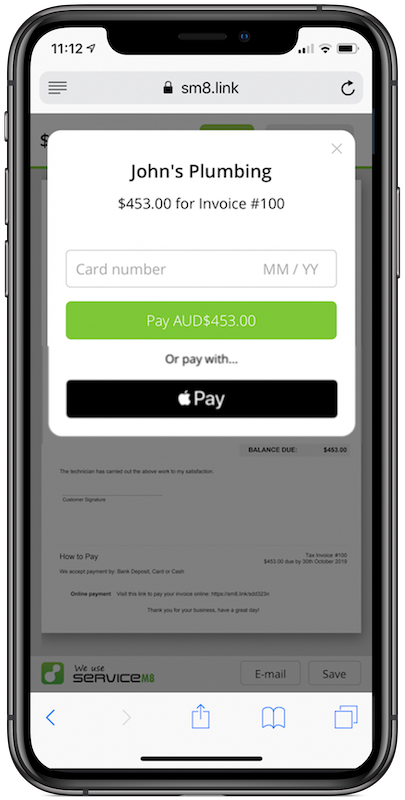
The link provided to the customer allows them to view the Invoice. If you have integrated your ServiceM8 account with Stripe, customers can also pay the invoice from this link. Learn how to connect your ServiceM8 account to Stripe.
Send an Invoice by SMS from the Mobile App
- Open the Job for which you would like to send an Invoice
- If you have already produced an Invoice PDF document for the job, tap Diary, then tap the Invoice to view it.
- Otherwise, tap Billing, then scroll to the bottom and tap Invoice to produce an Invoice PDF. The Invoice will automatically open once it has been produced.
- Tap the share button at the top right, then tap Send via SMS
- Adjust the message recipient or contents if required, then click Send to send the message.
The link provided to the customer allows them to view the Invoice. If you have integrated your ServiceM8 account with Stripe, customers can also pay the invoice from this link.