

Quotes and invoicing
What is Awaiting Approval used for?
Understand what Awaiting Approval used for is and how it works in ServiceM8.
Awaiting approval is basically an extra status that jobs go through, The job full process is:
Quote > Work Order > Completed > Awaiting Approval > Awaiting Payment > Paid
Total jobs pending approval
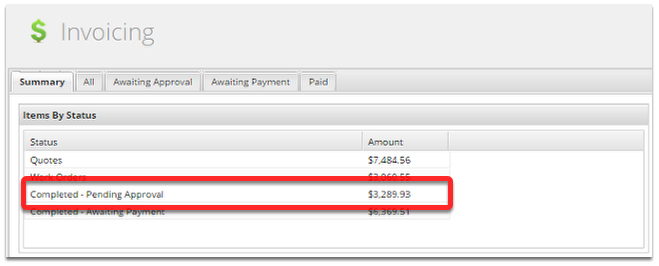
The summary page gives a quick overview of invoice totals at each job status.
Awaiting Approval Tab
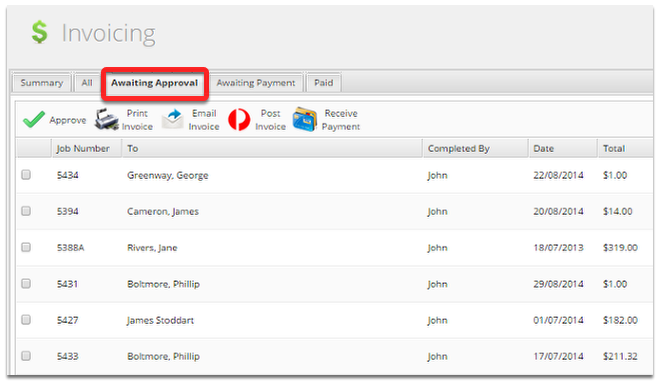
Awaiting Approval can be used in multiple ways:
- If your field techs don’t add materials they can be added here.
- If your field techs add material but need they to be checked it can be done here.
- For marking invoices as transferred to a non-integrated accounting package. (Approve invoices once the information has been transferred)
- When integrated to an accounting package approving sends the invoice to the accounting package to be tracked.
To approve, just tick a job and click Approve
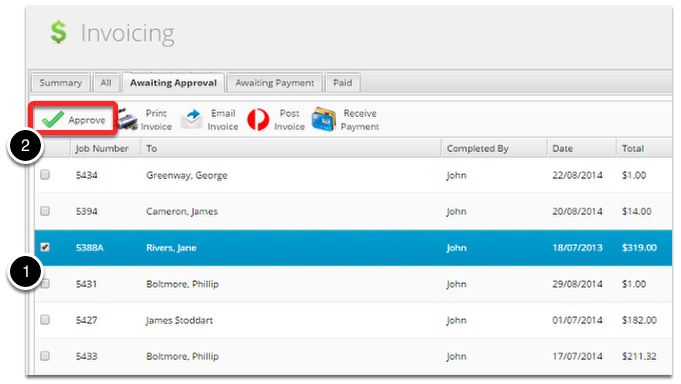
Approved jobs will move to awaiting payment.