ServiceM8 Help Center home page
Search for help... e.g. "send invoice" or "schedule job"
⌘K
Contact Support
Log In
Log In
Search...
Navigation
Jobs and scheduling
How to change the status of a job on the app
Getting Started
Help Center
Add-ons
What's New
Contact Support
Jobs and scheduling
Jobs and scheduling
How to create a job
How to schedule a job
How to mark a job as unsuccessful
What are Job Filters?
How to install the ServiceM8 desktop app for PC and Mac
How to dispatch urgent jobs
How to allocate jobs in booking windows
How to manage jobs with queues
How can I remove a job from a Queue?
How Job Filters work (Online Dashboard)
What are job highlights?
How to see a job's booking history
How to see a job's edit history
How to use the new Enhanced Job Card
How to delete a job
Team Scheduling: How to schedule multiple staff members to the same job
How can I quickly add new jobs for clients I deal with multiple times?
How can I manage jobs on hold?
How do I delete/remove jobs in ServiceM8?
The schedule only displays 8am to 5pm, how can I change it?
How to create a job in the iOS app
How to view your assigned jobs
How to start & navigate to a job on the app
How to schedule a job using the ServiceM8 iOS app
How to change the status of a job on the app
How to reschedule job bookings
How to stay in control using the Jobs view in the ServiceM8 App
How to customise the Job Actions bar
How to customise the Jobs view
What does Job Status mean?
What are Saved Searches?
What are Job Categories?
Can I set job numbers manually rather than automatically?
Can I add a prefix or suffix to job numbers?
How to set up queues
What is the difference between a Task and a Job?
Can the standard job status choices be customized?
How to reorder the Jobs, Staff & Queue lists in the App
Dispatch Board
Dispatch Board
Dispatch Board - Overview
Using Action Required to keep on top of jobs and scheduling
How to View Staff Status
How do I remove staff from the dispatch board?
How to view your Account Activity
How Global Search works
Events which trigger automatic notifications to field staff
What do the job dots mean?
How do I communicate with staff via the Dispatch Board?
How can I attach files to jobs on the Dispatch Board?
How to change the order of Staff Members
How to change the order of Queues
How to change a staff member's icon
What is 'Admin Time' and how does it work?
How to add business closed dates and sync public holidays
Quotes and invoicing
How to build and send your first quote
How to add materials to a job online
How to complete and invoice a job
How to create an invoice online
How to complete a job and receive payment online
Invoice management (Online Dashboard)
How to issue an invoice by email online
How to Send an Invoice by SMS
InstantPost
How Quote Versions & Quote Options Work
How to use a quote acceptance?
How to re-order items on Quotes and Invoices
Can I provide customers a discount off standard pricing?
Show & Hide the Tax Rate in the Quotes & Invoicing tab
How to set Payment Terms
What is Awaiting Approval used for?
How do I reverse a payment made on a job?
How to change an invoice date
How to save a quote or invoice to the Diary
How to access Billing and Job Actions menu
How to add labour & materials to a job
How to create and send an invoice in the app
How to complete a job and receive payment on the app
Collecting a customer's signature for quote or invoice sign off
Approving an invoice from the app
How to auto-approve invoices
How to view Stock Levels in the App & Online
How to use Quick Quote & Quick Invoice
How do I setup my invoice and quote templates?
How to send quotes for remote signature
How to insert section description lines in Quotes & Invoices
Automatic archiving of materials
How does toggling the “Amounts are” setting between Tax Exclusive and Tax Inclusive affect the Total Invoice amount?
What do I set the tax setting to when importing materials?
How to set your business up for Non GST/VAT
How to accept mobile payments in person using Scan & Pay
Clients and contacts
Client card overview
How do I add a contact to a client online?
How to view personal information relating to a particular client
How to update a client's details
How to delete a client record
How to fix a duplicate client
How do I manage customers with multiple locations?
How can I view the job history for a client?
How to edit the order of client first & last names
Communication
Communication
How to use ServiceM8's Two-Way SMS
How do I attach photos and files to Emails?
How SMS Booking Links work
How Two Way Email works
How Tagging & Smart Links Work
How to Edit Notes
How to delete notes and other items from the Job Diary
How to delete notes, photos, and other attachments from the Job Diary
How can I send a branded video to a client?
Customising automated confirmation email templates
Creating your own email template
How to create an SMS Template.
How to change the default SMS invoicing template?
How to change your email signature
How to activate additional staff notifications
Can I adjust the SMS template sent to clients when navigating to the job?
Can I change SMS messages to come from my business name rather than "ServiceM8"?
What kind of Email & SMS can I send through ServiceM8?
How to create an email template informing clients of your data handling practices
The mobile app
The mobile app
About the ServiceM8 Android app: ServiceM8 Lite
How to use ServiceM8 Lite for Android
How to use Booking Suggestions
What is Smart Labour?
Why is one of my staff members icon gray instead of coloured?
How much bandwidth does the app use?
I'm not receiving push notifications on my iPhone/iPad
Once I've Checked In & Out of a job on the app, where do I find it?
How can I disable automatic Check In & Check Out?
How do I use voice dictation in the ServiceM8 app?
How do I set up Caller ID with ServiceM8?
How can I email files from my Dropbox, Box, GoogleDrive, OneDrive or iCloud?
How ServiceM8 works with CarPlay
How to scan text with your camera to Forms, Assets, and Services
How do I attach files to jobs in the app (iOS)
Photos, notes and attachments
How to take and save photos to a job
How to clock on/off and start/end break
Camera - how Multi-Photo and Audio Tagging works
How to record and save videos to a job
How to scan paper documents using the app
How to mark up photos in the ServiceM8 app
How to draw diagrams in the ServiceM8 app
How to add fields to photos using Advanced Photo Branding
How to tag photos and videos
How to share job photos on Instagram and Facebook
How to import photos from the Camera Roll
How to add the ServiceM8 Camera to your Control Centre
How to minimise videos using Picture in Picture
How to filter a job Diary
Templates
Templates
Setting up invoice and quote templates - overview
How to modify invoice or quote templates
How to add banking details to invoices
How to create a merge field
How to remove itemised materials from invoices or quotes
Available fields for invoice and quote templates
How to download an invoice or quote template
How to add terms and conditions to your quote or invoice template
How to upload a modified or custom template to ServiceM8
Troubleshooting logos and images in invoice and quote templates
How do I add a 'Paid Stamp' to my invoice template?
What fonts can be used in ServiceM8's templates?
Tips for designing new invoice or quote templates
How to add material line bookmarks to custom invoice or quote templates
How to set up Quote & Form templates for remote signature
How to invoice with Domestic Reverse Charge (DRC) VAT in the UK?
Can I pay to have a template designed or altered for my business?
How to select new invoice or quote templates
Setting up Invoice templates for Real Estate customers
Accounting integrations
How do I connect ServiceM8 to Xero?
How the sync with Xero works
Sending your first job to Xero
Xero Tracking Categories
How to Remove a Payment from Xero
How do I change which Xero account receives payments from ServiceM8?
Resolving Xero invoice number conflicts
Setting your default invoice status to Awaiting Approval or Approved in Xero
Resolving contact archive errors
Resolving Xero invoice synchronization issues
What information goes into the Reference field in Xero?
What does 'You have reached the limit of invoices you can approve' mean?
How do I connect ServiceM8 to QuickBooks Online?
How the sync with QuickBooks Online works
Sending your first invoice to QuickBooks Online.
How to resend an invoice to QuickBooks Online?
How to sync the ServiceM8 Fields to the Custom Fields in QuickBooks Online Advanced
How do I integrate ServiceM8 with MYOB?
How do I integrate ServiceM8 with MYOB Essentials?
How the sync with MYOB works
How to send an invoice through to MYOB
What are the benefits of integrating ServiceM8 with MYOB?
How to resend an invoice to MYOB
Can payments sent from ServiceM8 to MYOB be automatically sent to undeposited funds?
What is the MYOB add-on Connector?
What happens to my data when I integrate SeviceM8 with MYOB?
I cannot see the MYOB Integration Wizard under settings
Will I still be able to generate invoices in MYOB that are not registered in ServiceM8?
How to transfer Work Completed to MYOB
How to update the MYOB Connector
How to restart the ServiceM8 MYOB connector
What is the best approach to invoicing now that I've integrated MYOB?
Does ServiceM8 integrate with MYOB AccountEdge products?
Error when Starting the ServiceM8 MYOB Connector with AVG Anti Virus
Which accounting packages does ServiceM8 connect to?
Why you should use a cloud accounting package
How invoicing works with a non-integrated accounting package
Approving jobs without syncing to accounting
Staff and security
Staff and security
How to set up Two Step Authentication
How to create a custom security role
Security Roles Overview
Security Roles Reference
Can my staff produce work orders instead of invoices through the checkout wizard?
How to prevent staff members from creating items
How to set up Save As You Go item pricing
How do I change a staff member’s password
How to change your login Email
How to change a staff member's Security Role
What to do if you have a staff member leave the business.
Two Step Authentication: Frequently Asked Questions
How to change Account Owner login email and phone number
Correcting an existing account login error
Account and billing
Account and billing
What does ServiceM8 Cost?
How to cancel my account?
What happens if I stop using ServiceM8?
How to reset your password when you’ve forgotten it
Who owns my ServiceM8 account and its data?
How safe is my ServiceM8 data from data loss?
How to download a backup of your ServiceM8 data
How to Sign in with Passkey
How to earn Bonus Jobs on the Free plan
Using Sign in with Apple for ServiceM8
Changing an Apple private relay email address
How do I install ServiceM8?
How can I pay for ServiceM8?
How do I get billed for ServiceM8?
Managing your ServiceM8 plan through Apple subscriptions
Changing your subscription plan from Apple to ServiceM8
What counts as a job credit?
How do I manage having one company with multiple business'?
General FAQ
Not all my staff have Apple devices. How can I use ServiceM8?
How to import Materials and Clients
How to create and use Checklists
How to create a task
How to edit Check In data
Online Booking SMS Extension
Using the Staff Schedule on the iPad
How to FaceTime call other staff
iOS Features
How to Drag and Drop files and contacts into the ServiceM8 app (iPad only)
How to Find Which Job You're Checked In To
How to use ServiceM8 with Siri Shortcuts
How to use ServiceM8 Measure
How to use Barcode Scanning
How to use Automated Time Tracking
Can check-in/out data be edited?
How to view the job history for a client
My jobs are not syncing to the app immediately, what is wrong?
I can't see any invoice/quote template designs in the Document Templates screen or on the Dispatch Board
ServiceM8 iOS & Device compatibility
Does ServiceM8 have an API?
ServiceM8 and the GDPR
Does ServiceM8 support Xero?
Do you provide an uptime guarantee?
Which countries are usable with ServiceM8?
Why would I use ServiceM8 on a mobile devices?
Does ServiceM8 support Android-based devices? Yes
What mobile devices are supported?
Can I change the currency used in ServiceM8?
Which languages are supported?
How to submit feature ideas for ServiceM8
Why can I see add-ons in my account that I can't see on my customer's accounts?
What if I need a feature that is not available?
What is a ServiceM8 Partner?
How to Disconnect from a Partner
ServiceM8 14
How to connect ServiceM8 to ChatGPT with MCP
How to find a Job Checkout Report
What's new in ServiceM8?
How to scan barcodes in Forms, Assets and Services
How to set up Back Tap shortcuts with iPhone
How to add Next Job or Jobs List widgets to the Home screen
How to set a default labour rate for a staff member
How to set a default income account for new Materials & Services
On this page
Open a job
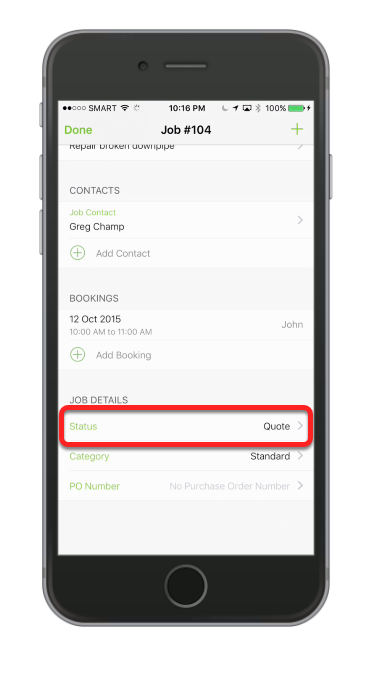
Scroll down inside the job, then under the Job Details tap Status
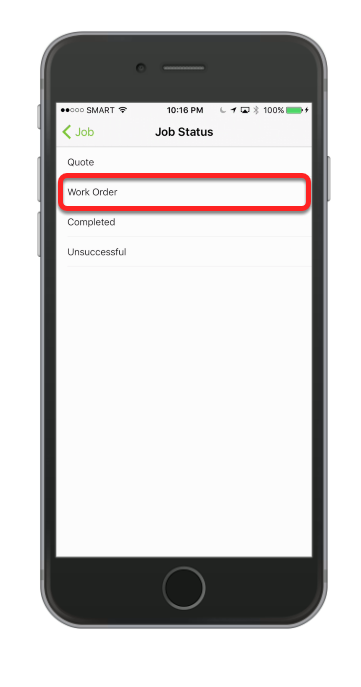
Tap to select a new job status
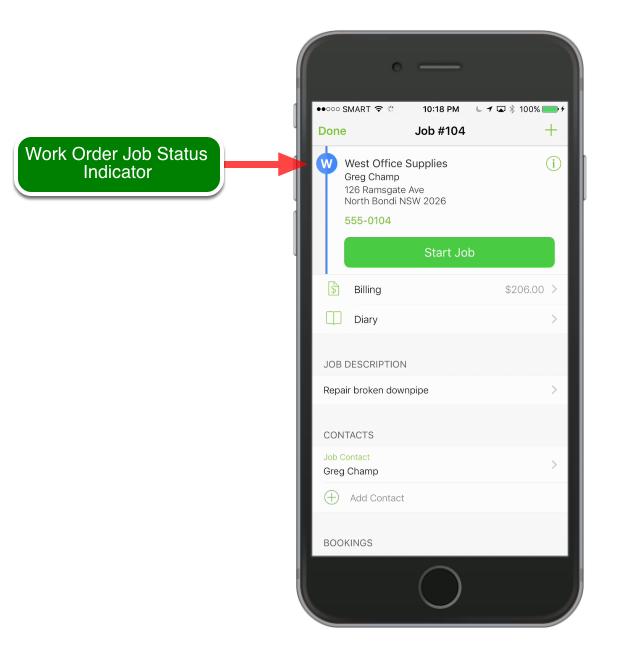
That’s it and you’re done!
Related articles
Jobs and scheduling
How to change the status of a job on the app
Copy page
Learn how to change the status of a job on the app in ServiceM8.
Copy page
This lesson will show you how to change the status of a job.
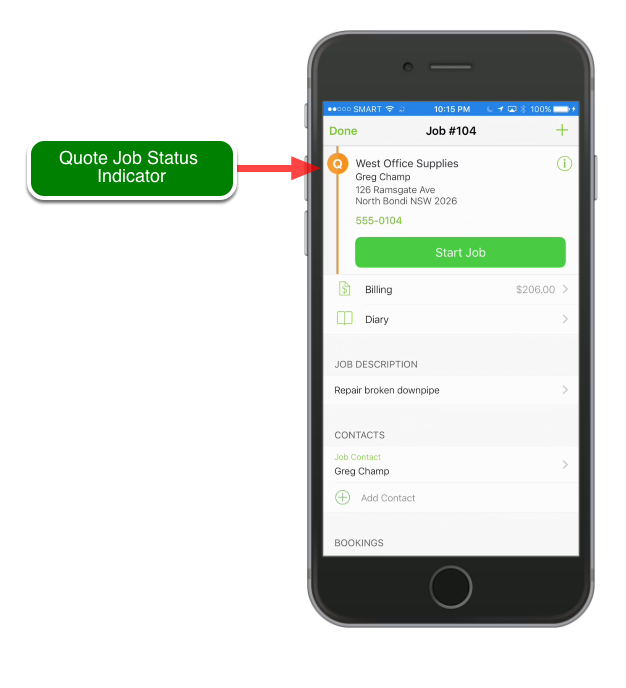
Open a job
Scroll down inside the job, then under the Job Details tap Status
Tap to select a new job status
That’s it and you’re done!
Related articles
What does Job Status mean?
How to view your assigned jobs
How to complete a job and receive payment on the app
How to create a job in the iOS app
Last modified on February 10, 2026
Was this page helpful?
Yes
No
How to schedule a job using the ServiceM8 iOS app
Previous
How to reschedule job bookings
Next
⌘I