

Dispatch Board
Events which trigger automatic notifications to field staff
Learn about events which trigger automatic notifications to field staff in ServiceM8.
Notifications are automatically sent to staff members logged into the ServiceM8 mobile app, when:
- A job is scheduled to them (or a scheduled job booking is changed) sometime before midnight that day.
- A job is allocated to them (e.g. as ‘Urgent’, or in a certain booking window such as ‘During Business Hours’.
- A instant message is sent to them through ServiceM8 (messages can be sent to other team members through the Activity tab of the app, or through the staff member icons in the Dispatch Board online).
If staff aren’t receiving notifications, it’s usually due to Push Notifications not being enabled on the device, or enabled for the ServiceM8 app.
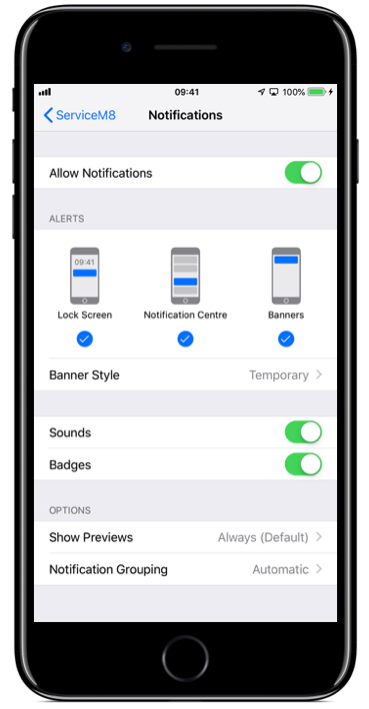
Check notification permissions on iPhone and iPad
Go to Settings > ServiceM8 > Notifications, and enable Notifications options:
Check notification permissions on Android
Open your device’s Settings, go to Notifications > App notifications, select ServiceM8, and turn on notifications. The names and location of these settings vary by device. See Google’s Android notification guidance.