

Dispatch Board
How to view your Account Activity
Learn how to view your Account Activity in ServiceM8.
ServiceM8’s Account Activity log is a feature which gives you visibility of who is accessing your ServiceM8 account, when, and significant actions they have taken.
This lets the Account Owner and senior staff in the business keep an eye on access and changes across the account, and provides the ability to watch out for unusual or suspicious activity.
Where to view Account Activity
To view your account activity log, in your Online Dashboard, go to Settings > ServiceM8 Account > View Account Activity:
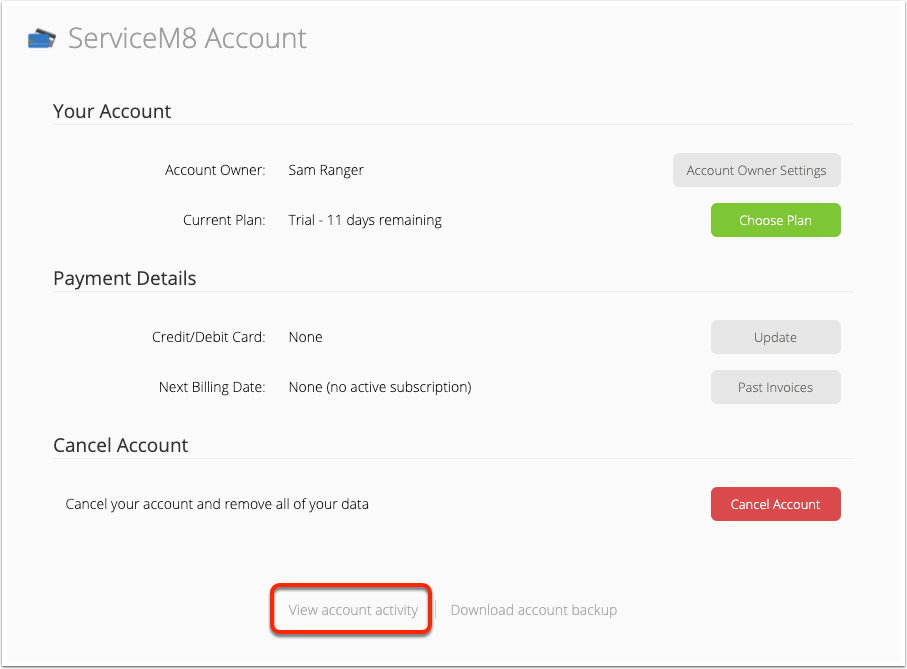
Any user who has access to ServiceM8 Account can view the Account Activity log.
The log stores data for 90 days, after which it is automatically cleared. Account activity data cannot be exported.
Understanding Account Activity
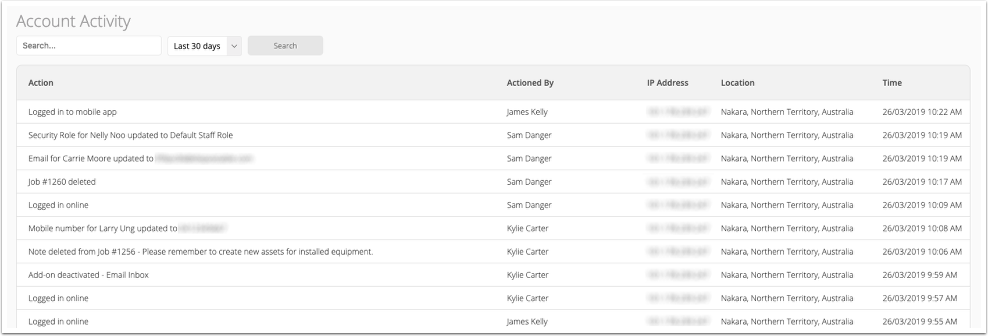
The account activity log is displayed in a table, with the following columns:
- Action: the event or activity carried out on the ServiceM8 account (see a full list of actions in the table below).
- Actioned By: the ServiceM8 user whose account was used to complete the action.
- IP Address: the Internet Protocol address of the wifi, mobile, or broadband network that was used to access ServiceM8 to complete the action.
- Location: the geographic location associated with the IP address. Note that this can be affected by the nature of the connection and its routing.
- Time: the date and time that the action was completed.
Action
Explanation
Logged in online
When a user logs into their account via the Online Dashboard.
Logged in to mobile app
When a user logs into their account via the ServiceM8 app.
Login failed
When a user has attempted to log into their account using an incorrect password.
Job deleted
When a job has been deleted via the Job History tab of the Online Dashboard.
Note deleted
When a note has been deleted from a job through its Job Diary.
Payment removed
When a recorded payment has been deleted from a job.
Email updated
When the email address of a staff member has been changed.
Password updated
When the password of a staff member has been changed.
Password reset
When the password of a staff member has been reset using ServiceM8’s “Forgot Password” tool.
Mobile number updated
When the mobile number of a staff member has been changed.
Security role updated
When the security role of a staff member has been changed.
Job Export Report downloaded
When the Job List has been downloaded via the Reports tab of the Online Dashboard.
Client Export Report downloaded
When the Client List has been downloaded via the Reports tab of the Online Dashboard.
Add-on activated/deactivated
When an Add-on has been activated or deactivated. This includes third-party add-ons and API Approvals for a third-party add-on to connect to your ServiceM8 account.
Job approved without sending to accounting package
When a job’s invoice is specifically Approved without it being sent to the connected accounting package.
Subscription changes
When a ServiceM8 subscription is started, changed, or cancelled for the account.
Helpdesk Wizard Completed
When a ServiceM8 Helpdesk Wizard has been used, such as to restore a deleted job.
To filter the activity log, enter an ‘Action’ keyword in the Search field, select from either the ‘Last 30 days’ or ‘Last 90 days’, then click Search.
Edit & Booking History
To see a history of changes to a job’s Description, Work Completed, or the details of job contacts, see How to see a job’s edit history.
To see a history of a job’s bookings, see How to see a job’s booking history.
Requesting Detailed Information & Logs
If you are interested in account activity or information that is not available in your ServiceM8 account, then it is not within the scope of the ServiceM8 product and support offering. If you contact ServiceM8 Support with a request for information regarding a specific event in your account, please note that ServiceM8 Support is not required to investigate account activity on request, and is not required to provide additional information or detailed logs regarding specific user actions or events related to your account.