

Staff and security
Correcting an existing account login error
Troubleshoot issues with correcting an existing account login error in ServiceM8.
Every staff member in ServiceM8 must have their own unique email address that can send and receive emails. One email address cannot be used for multiple accounts or multiple staff members.
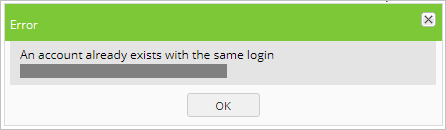
If you try to add a staff member but their email is already attached to a ServiceM8 account, you will receive the following error message:
Causes and fixes
Here are some likely causes of the error message, and how you can correct the issue.
Previous ServiceM8 trial account
The staff member may have previously created a ServiceM8 trial account with that email.
To correct the issue:
- The staff member will need to log into their trial account and cancel their account (if it’s no longer in use).
- Once the account is cancelled, you will be able to add the staff member to your account using that email.
Previous access to another ServiceM8 account
The staff member may still be linked to another ServiceM8 account (for example, a previous employer) to which they don’t need access.
To correct the issue:
- The staff member can contact the owner of that account and ask that their email address be removed. Once the email address has been removed, you will be able to add the staff member to your account using that email; or
- The staff member can click here to step through a process to remove their email from the account.
Existing ServiceM8 account
Using the same email, the staff member may already have an account with ServiceM8 to which they still need access.
To correct the issue:
- You will need to use a different email address when adding the staff member. That will let them access their original account as well as your account.