Quotes and invoicing
How do I reverse a payment made on a job?
Find out how to reverse a payment made on a job in ServiceM8.
You can reverse a payment recorded on a job from its Job card in the Online Dashboard.
Note: If you use ServiceM8 Pay or Stripe Payments, removing a payment record in ServiceM8 does not refund the money in Stripe.
Open the Job card
Open the job you want to reverse the payment on. You can open the Job card from anywhere in the Online Dashboard.
Open payments and delete the payment
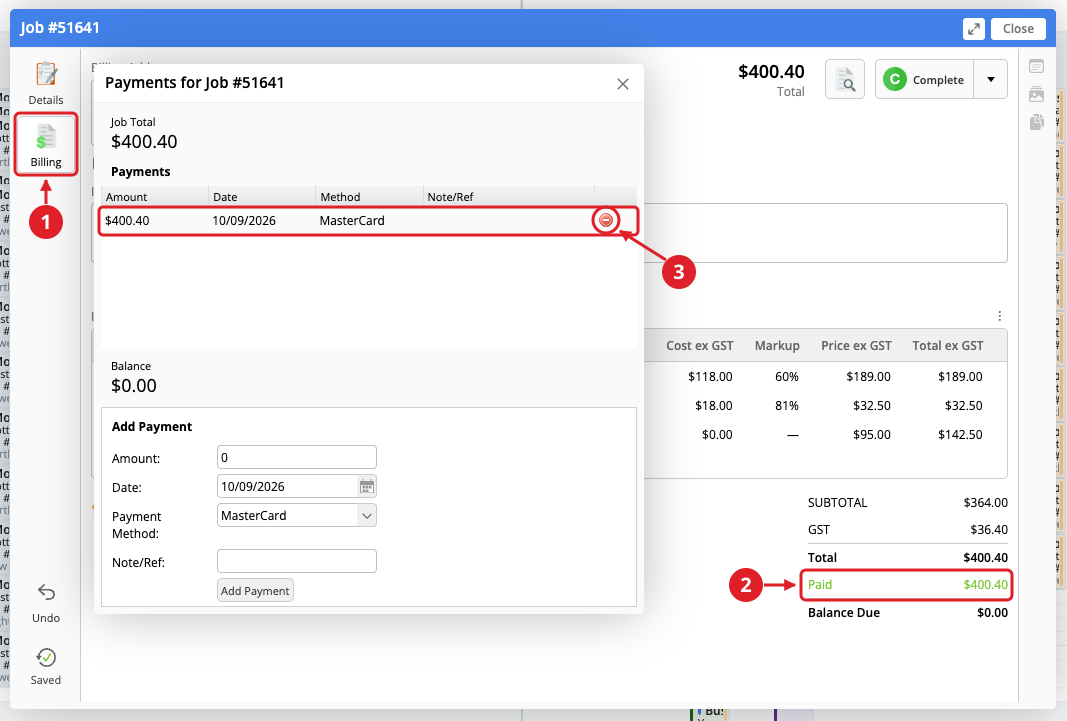
- Select Billing on the left of the Job card.
- Click the green Paid line in the bottom-right corner. This opens the Payments for Job #… window.
- Hover your cursor over the payment row to reveal the red Delete button at the right of the row, then click it.