

Templates
How to add banking details to invoices
Learn how to add banking details to invoices in ServiceM8.
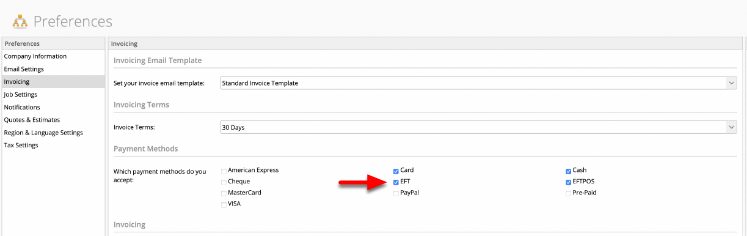
NOTE: For banking details to appear in applicable ServiceM8 invoice templates, you must first select EFT (electronic funds transfer) as a payment method in Settings > Preferences > Invoicing from the Online Dashboard.

There are two ways you can add banking details to your invoices, both of which involve invoice templates:
1. (easiest!) Choose a new invoice template.
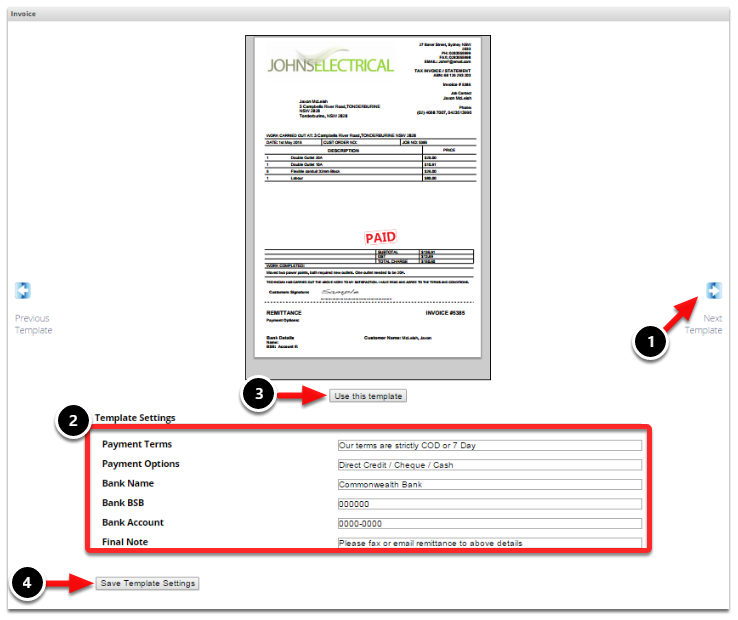
Go to Settings > Document Templates from the Online Dashboard and select an invoice template with built-in fields for banking information. The picture below is an example of an invoice template that has bank account details built into the customisable template settings.
Go to this article to learn how to select a new invoice template.

2. Add text to an existing template
If you don’t want to switch to a template that contains bank account details by default, you can also add banking information to your invoices by adding static text to your current template.
If you’re comfortable using Microsoft Word, refer to this article to learn more about modifying templates.
And, as always, if you don’t have the time or inclination to modify your template yourself, our ServiceM8 Partners can provide professional help.