

Account and billing
Managing your ServiceM8 plan through Apple subscriptions
Learn how to manage your ServiceM8 plan through Apple subscriptions in ServiceM8.
As your business needs change, you may want to change your ServiceM8 plan.
If you set up your ServiceM8 plan as an Apple subscription directly within the ServiceM8 mobile app, then you must manage your subscription using the same Apple ID that originally purchased the plan.
To review your Apple subscription status:
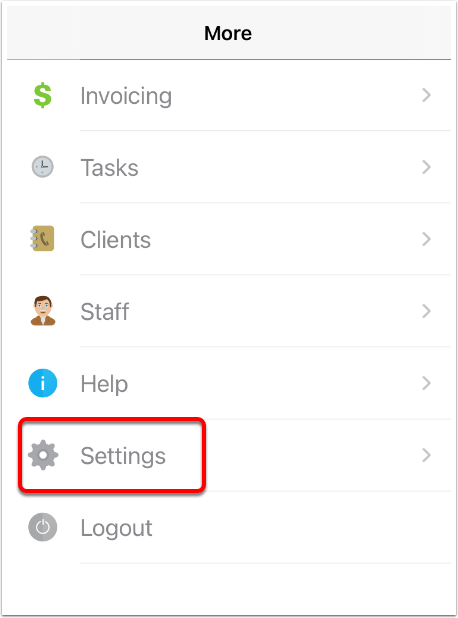
- Log in to your mobile ServiceM8 app and tap More.

- Tap Settings.
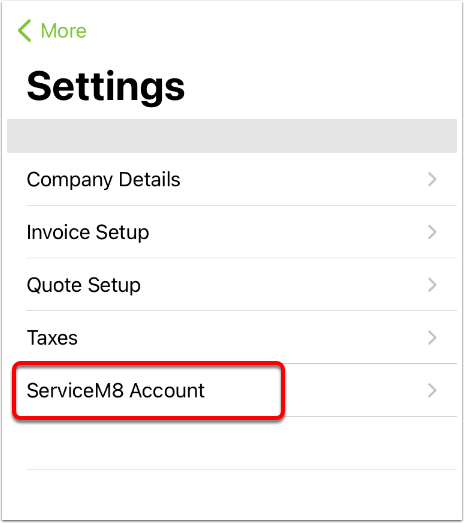
- Tap ServiceM8 Account.
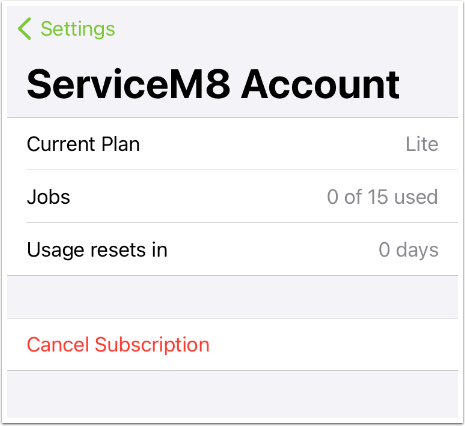
- Your ServiceM8 account details will appear, including your current plan, the number of jobs you have logged within the usage period, and when the usage period resets.
To change your ServiceM8 plan:
- Tap Current Plan. A popup window will allow you to scroll and choose between Lite, Starter, and Growing plans.
- To move up to the Premium or Premium Plus plan, or to purchase ServiceM8 add-ons, see Changing your subscription plan from Apple to ServiceM8.
To cancel your Apple subscription:
- Tap Cancel Subscription. Your Apple Subscriptions page will open.
- Tap ServiceM8 and cancel your subscription. Your plan will revert to Trial.
Note that canceling your Apple subscription will cancel your paid subscription, but it does not cancel your ServiceM8 account. If you want to resume using ServiceM8 at a later date, you can resubscribe by logging in to the app and changing your ServiceM8 plan.
Once you have cancelled your Apple subscription, if you also want to cancel your ServiceM8 account, see How to cancel my account?