

Accounting integrations
Setting your default invoice status to Awaiting Approval or Approved in Xero
Learn how to set your default invoice status to Awaiting Approval or Approved in Xero in ServiceM8.
When you sync invoices to Xero, you have the option of making the default invoice status be Awaiting Approval or Approved. You can make this change at any time.
To set your default invoice sync setting to Awaiting Approval or Approved:
- Go to Settings > Invoicing and scroll down to the Xero section.
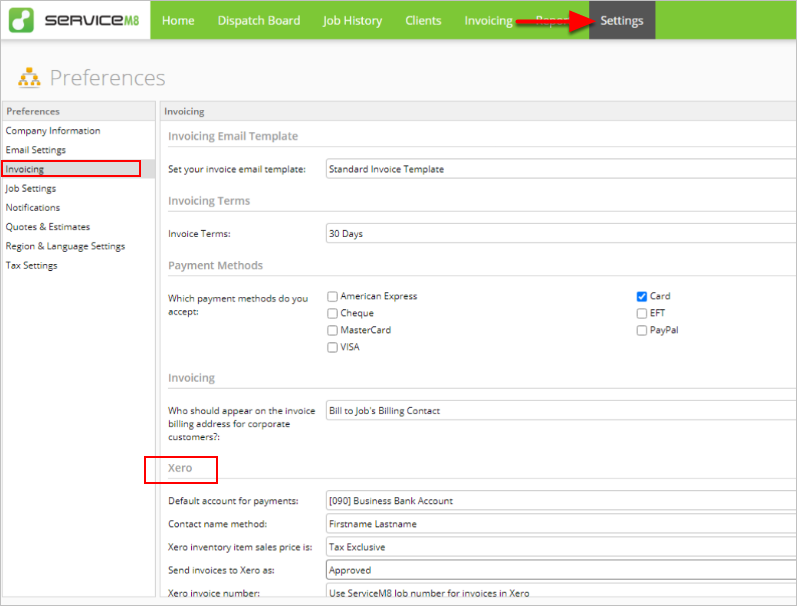
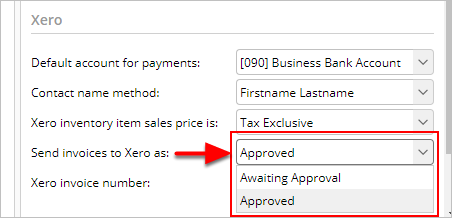
- Click the drop-down arrow next to Send invoices to Xero as:
- If you want to sync your invoices as draft, click Awaiting Approval.
- If you want to sync your invoices as approved, click Approved.
- On the bottom-right, click Save.
