

Communication
Tips for completing your Australian Branded SMS registration
Prepare the details and documents needed for Australian Branded SMS sender ID registration in ServiceM8.
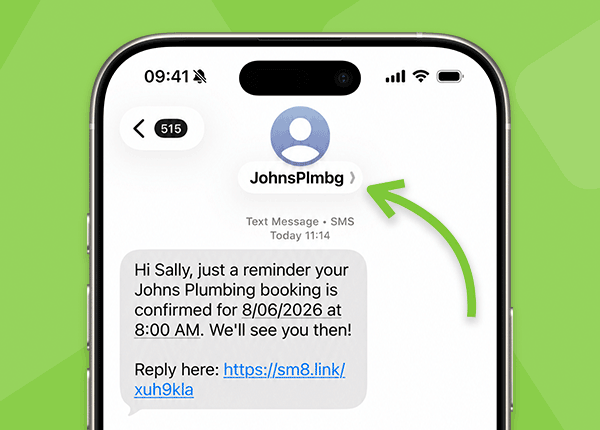
This article applies only to Australian customers registering or resubmitting a custom SMS Sender ID for Branded SMS.
Before you start your registration, or before you resubmit after a rejection email, take a few minutes to prepare the details and documents below. This can reduce the chance of your application being rejected or delayed.
For more information on Sender ID registration requirements, see Australian SMS sender ID registration.
The registration form opens in a secure embedded flow. Complete the details carefully and upload the required documents inside the form before submitting.
Important: Documents sent to ServiceM8 Support do not update your application. Upload documents inside the registration form and continue until you see Registration Submitted.
Previously approved? You may still need to re-register
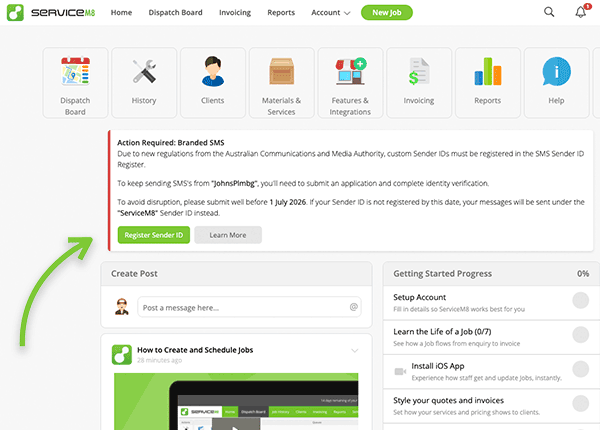
If you see a Home tab notice or a Register Sender ID prompt for Australian Branded SMS, complete the current Australian Sender ID Register workflow even if your Sender ID was previously approved.
If your application was rejected or needs action
Your rejection email lists the item or items that need to be corrected. If the email lists more than one issue, fix each issue before resubmitting.
To resubmit, reopen the Branded SMS registration flow from ServiceM8, update the details or documents in the embedded registration form, and submit the application again. Do not send documents directly to ServiceM8 Support unless Support specifically asks you to.
What to prepare before you start
- A current business registration extract or incorporation document, such as an ASIC company extract where applicable, showing your legal business name, registration number, registered address, and listed officers, directors, or authorised contacts.
- Your exact business registration number, such as ABN or ACN, exactly as it appears on your official business record.
- A physical registered business address. Do not use a PO Box.
- A working public website or landing page that clearly represents your business, brand, or Sender ID.
- Evidence that your requested Sender ID belongs to, or is clearly connected to, your business, trading name, brand, trademark, or domain.
- Government ID for a listed officer or director, or government ID for an authorised representative plus a signed Letter of Authorisation from a listed officer or director.
Choose the right entity type
The registration form may use generic international entity types rather than Australian labels. Choose the option that best matches your official registration record.
| Australian entity type | Closest form option |
|---|---|
| Proprietary Limited / Pty Ltd company | Private Corporation is usually the closest match. |
| Sole trader | Sole Proprietorship. Use the registered business details exactly as shown on official records. |
| Partnership | Partnership. Use the partnership details exactly as shown on official records. |
| Public company | Public Corporation. Use this only if the business is actually a public company. |
| Co-operative | Co-operative. Use this only if it matches the legal structure shown on official records. |
| Government entity | Government. Use this only if the entity is a government organisation. |
| Non-profit, incorporated association, or charity | Non-profit Corporation may be the closest option if it best matches the legal structure. |
Choose your Sender ID text
Your Sender ID is the SMS “from” text your clients see.
- Use 2-11 characters, up to the maximum 11 characters allowed for Branded SMS Sender IDs.
- It may contain a-z, A-Z and 0-9 only. Symbols and spaces are not supported.
- Include at least one letter.
- Do not use all numbers.
- It must not be misleading or unrelated to the business.
- Choose a Sender ID that clearly matches your registered business name, registered trading name, brand, trademark, or domain.
- Avoid generic Sender IDs that could apply to many businesses, such as ALERT, INFO, UPDATE, or only describing a trade or service, unless you can clearly show the Sender ID belongs to your business.
Prepare Sender ID proof
- If the Sender ID does not exactly match your legal business name, prepare evidence showing the connection.
- Useful proof may include a company extract, registered business name, matching .au domain, Australian trademark, international trademark, or another form of authorisation.
- If a company uses a trading name, provide ASIC, ABR, or other official proof showing the trading name belongs to the same ABN, ACN, or legal entity.
- For trust or trustee structures, provide documents that connect the trust, trustee, trading name, ABN, and requested Sender ID.
- For franchise or “trading as” brands, provide both the legal entity proof and the business-name, franchise, trademark, or brand proof that connects the Sender ID to the entity.
Check website and domain evidence
- Before applying, check that your website is current in the Online Dashboard under Settings > Preferences > Company Information > Website Address.
- Use a working public website or landing page that clearly shows the business, brand, or Sender ID.
- Use the same live public website in the registration form, preferably the main HTTPS version of your website.
- Social media-only pages, marketplace profiles, login-required pages, under-construction pages, redirects to unrelated domains, or unrelated websites may not be accepted.
- If you use a domain as evidence, make sure the domain or website clearly connects to the registered business or brand.
- If you use a related or secondary domain, include evidence connecting that domain to your business.
Prepare authorised representative details
- The simplest path is usually for a listed officer or director on the business extract to provide their government ID.
- The authorised representative must either appear on the business extract as an officer, director, or authorised contact, or the application must include a signed Letter of Authorisation from someone who does.
- Enter the authorised representative’s legal name exactly as it appears on their government ID.
- Check spelling, middle names, hyphens, and name order before submitting.
- Use a business email address for the authorised representative where possible.
Prepare government ID
- Upload an acceptable government-issued photo ID for the authorised representative, such as a passport or driver licence. Non-photo documents are not accepted as identity proof.
- The authorised representative’s legal name in the application must exactly match the name on the ID.
- Check that the issuing country and authority selected in the application match the ID you upload.
- Upload a clear, uncropped, readable, unaltered copy of the ID.
- If the ID has a front and back, include both sides.
- Make sure all text and the photo are readable.
Letter of Authorisation checklist
If you need to upload a Letter of Authorisation, or LOA, check that it:
- Shows the Sender ID exactly as entered in the registration form.
- Shows the same legal business name and ABN, ACN, or business registration number as your registration document.
- Names the person or people authorised to give instructions for the Sender ID, including their role or relationship with the business and email address.
- Includes the scope of authorisation, business contact details, authorised representative details, listed officer or director details, and the date.
- Is signed and dated by a listed officer, director, or authorised person.
- Uses business letterhead or clearly identifies the business.
You can use the Letter of Authorisation template to prepare your document.
What happens after you submit
Registration is not instant. The details and documents you submit must be reviewed and approved before the Sender ID can be registered. If further information or verification is needed, you will be advised by email.
To retry or resubmit, use the Sender ID registration notice in the Home tab and update the application in the registration form.
ACMA approval and ServiceM8 activation are related, but they are not always completed at the same time. If you receive an ACMA approval email, your Sender ID may still need final provider confirmation or ServiceM8 activation before SMS from ServiceM8 starts using that Sender ID.
Until activation is complete, outgoing SMS may continue to appear from ServiceM8.