Jobs and scheduling
What are job highlights?
Understand what job highlights are and how it works in ServiceM8.
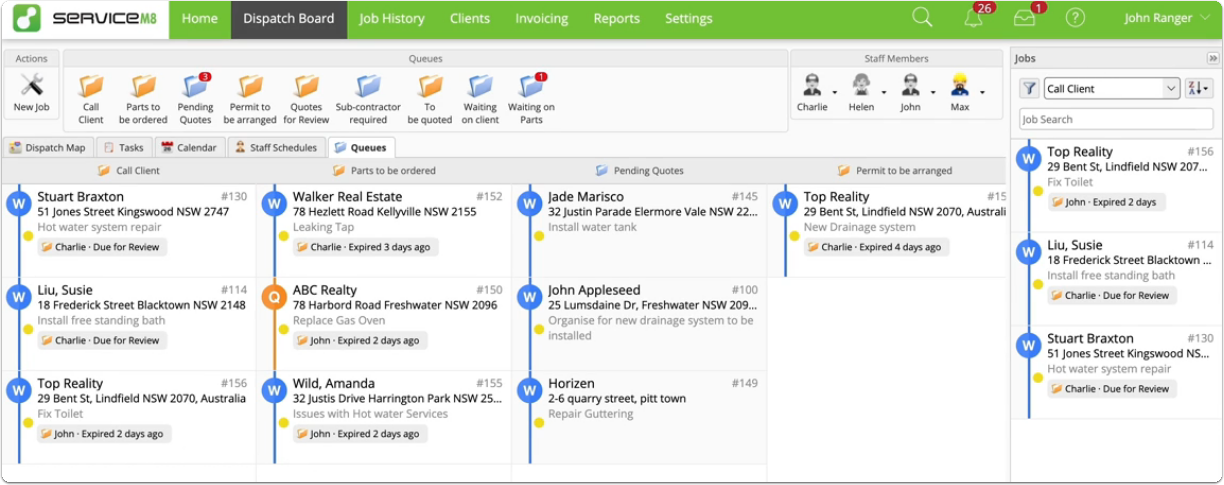
Job highlights are used in smart lists (found in the Jobs view in the ServiceM8 App, and in the Jobs list in the Online Dashboard) and on the Queues board. Job highlights let you instantly see why a job requires action and, in many cases, take action - without having to open the job card itself.
For more about Jobs view and smart lists, see this article.
The following outlines examples of types of job highlights you may see in smart lists:
- Assignable queue expired - Job assigned to a staff member in an assignable queue that has expired from the queue without progress

- Queue expired - Job sitting in a general queue that has expired from the queue without progress

- Unread customer reply - A customer has sent a reply via text or email that has not been either addressed or dismissed

- Unread job diary mention - You have been tagged in a comment in the job diary but haven’t read it yet

- Job expired - Job was scheduled to you, but the scheduled date has passed and you did not reschedule, queue, or mark the job as completed or unsuccessful
- Uncompleted tasks - Jobs with tasks assigned to you that you have not yet completed

On the Queues board, you will also see job highlights. They include:
- Names of staff members assigned to jobs
- Due for review, indicating a job has expired from a queue in the last 24 hours
- Expired, indicating a job has expired from a queue more than 24 hours ago