

Accounting integrations
Sending your first invoice to QuickBooks Online.
Learn how to send your first invoice to QuickBooks Online in ServiceM8.
This lesson will show you how to send your first job through to QuickBooks Online.
Open the job, and change the job status to Completed
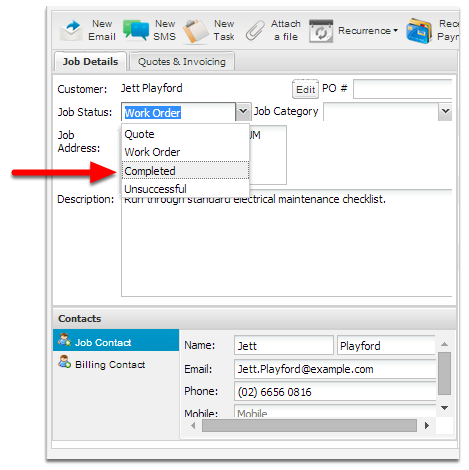
Click Save

Then go to the Invoicing page to approve the invoice to be sent through to QuickBooks Online.
Click Invoicing
Click Awaiting Approval tab
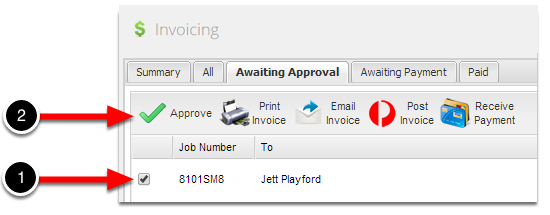
To send the invoice to QuickBooks online, tick the job and then click the Approve button.
Once you’ve pressed the Approve button, the invoice will begin syncing to QuickBooks online.

If there are any issues processing the job, you will get a red cross - hover your mouse over the cross to get additional information on how to resolve the issue.
Finish

Once the invoice has successfully been raised in QuickBooks Online, the spinning circle will turn into a green tick.
Congratulations, you’ve just sent your first job through to QuickBooks Online!