

General FAQ
How to set up Back Tap shortcuts with iPhone
Learn how to set up Back Tap shortcuts with iPhone in ServiceM8.
A new feature in iOS14 is Back Tap shortcuts, which give you the ability to tap the back of your phone to access a shortcut.
To use this feature with ServiceM8, you first need to create Siri Shortcuts for ServiceM8. Learn how to do this in our help article How to use ServiceM8 with Siri Shortcuts
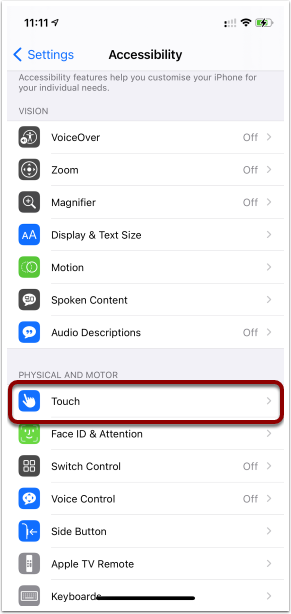
Once you have Siri Shortcuts set up you can set up your Back Tap shortcuts. On your iPhone, go to Settings > Accessibility > Touch
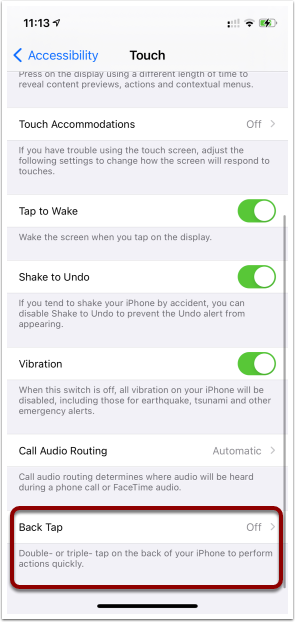
Scroll down to Back tap
You can set shortcuts for double tap and triple tap
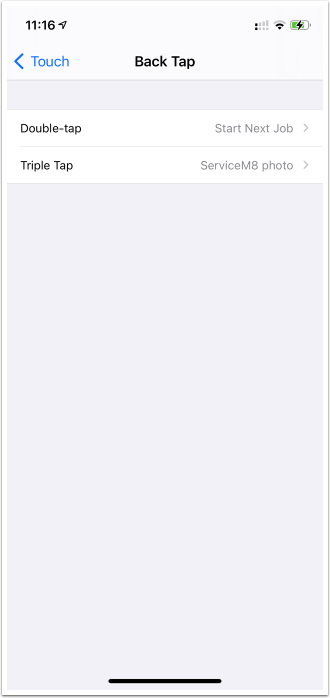
Back Tap can be used to start any Siri Shortcut. For example, you could setup a double-back-tap to start your next job in ServiceM8, or you could setup triple-back-tap to open up the ServiceM8 camera.
This can save you time by speeding up those common tasks in ServiceM8.