

General FAQ
How to set a default income account for new Materials & Services
Learn how to set a default income account for new Materials & Services in ServiceM8.
When you Approve an invoice in ServiceM8 to sync through to your accounting software, if the invoice contains new items, materials or services, you’ll be prompted to assign each new item to an income account.
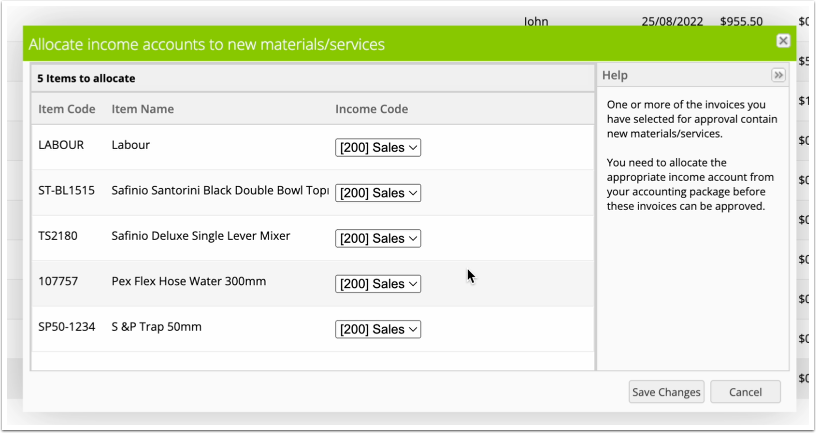
However, if you only use one income account, you can avoid this step and streamline the Approval process, by setting a ‘Default income account for new items’. To do so, go to Settings > Preferences > Invoicing.
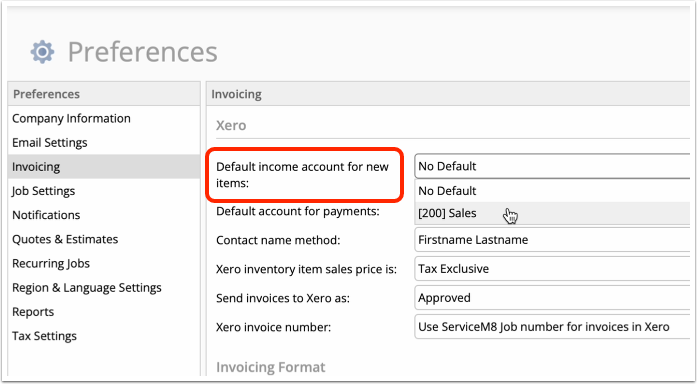
Once set, you won’t be prompted to assign new items to income accounts when you’re approving invoices — they’ll be set automatically.