

Online Booking
How to accept a deposit or payment with the Services Add-on
Learn how to accept a deposit or payment with the Services Add-on in ServiceM8.
If you have a Self-Serve Online Booking form set up through the Services add-on, it’s possible to accept either a deposit, or full pre-payment from your clients, as part of the online booking confirmation process.
You will need to have activated the Stripe add-on and connected a Stripe account to your ServiceM8 account in order to accept payments this way (see here for how to setup a Stripe account through ServiceM8).
Customers can pay by:
- entering their credit or debit card details; or
- if they use Apple Pay, Google Pay, or Microsoft Pay with the device they’re on, they will have the alternative option of paying this way:

Setting up Online Payment
In your Service Manager, open the service for which you’d like to accept deposits or full pre-payment.
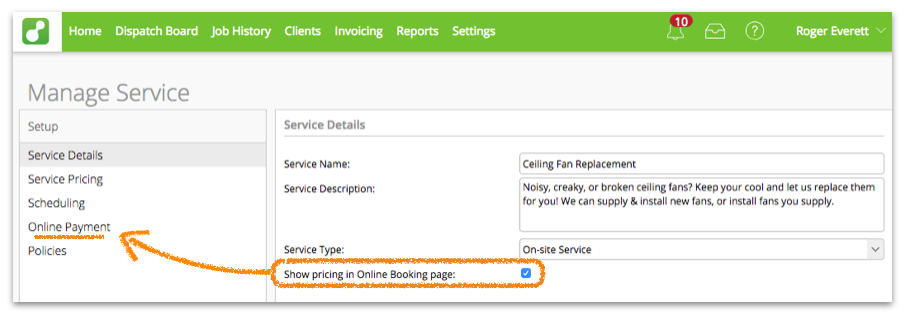
In the ‘Service Details’ view, ensure ‘Show pricing in Online Booking page’ is checked.
This will make the ‘Online Payment’ settings appear in the left-hand menu:
In the ‘Online Payment’ view, you can set whether to Collect Deposit or Collect Full Payment:
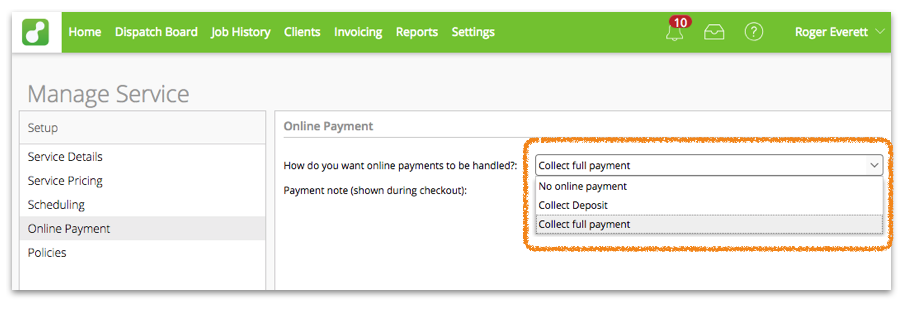
If you want to collect a deposit, you can choose to set a fixed amount, or collect a percentage of the total price:

Click Publish and go through the Service Publishing wizard to publish or update your online booking page.