

Add-ons FAQ
How to activate Cellular Network Fallback on ServiceM8 Phone
Learn how to activate Cellular Network Fallback on ServiceM8 Phone in ServiceM8.
ServiceM8 Phone uses mobile data (i.e. mobile internet) to make & receive calls, so when you’re working in an area with low network coverage, the call quality can be affected.
For those times you’re in a low-coverage area, you can try managing the call experience with clients by switching ServiceM8 Phone over to the standard phone network.
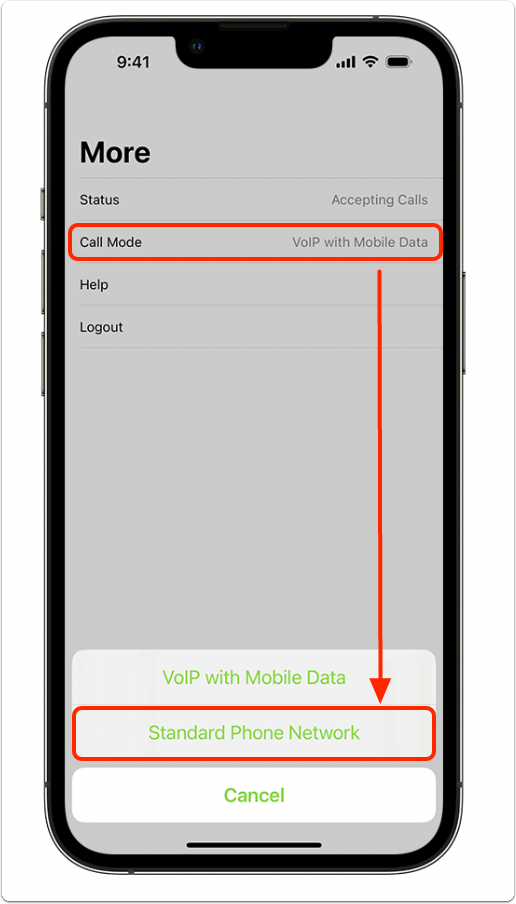
To do so, in the ServiceM8 Phone app tap More > Call Mode > Standard Phone Network:
NOTE:
- Remember to switch the Call Mode back to VoIP with Mobile Data when you’re back in a high-coverage area.
- Avoid creating a call loop! Be careful when using the Standard Phone Network mode if you also use Call Forwarding/Call Diversion on your iPhone. If you’re in the call group, and your iPhone is also set to forward calls back to your ServiceM8 Phone number, this can unintentionally create a call loop which will prevent you from being able to answer calls.