

ServiceM8 Phone
How to copy phone numbers from ServiceM8 Phone into the ServiceM8 App
Learn how to copy phone numbers from ServiceM8 Phone into the ServiceM8 App in ServiceM8.
When you receive a call in the ServiceM8 Phone app, you can copy the number to your clipboard. Once it’s copied, you can paste it to a client’s contact info in the ServiceM8 App.
To copy a phone number from the ServiceM8 Phone app:
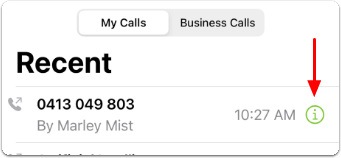
- Tap the call info symbol associated with the number you want to copy.
- Tap and hold the number until Copy Phone Number appears.
- Tap Copy Phone Number.
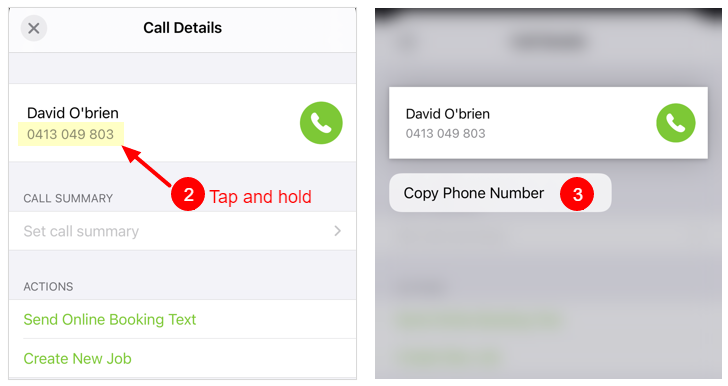
The phone number is now saved to your clipboard.
To paste the phone number into the ServiceM8 App:
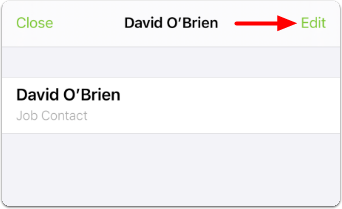
- Once you have opened the appropriate client billing or job contact in the ServiceM8 App, tap Edit.
- Tap, hold briefly, and release in the field to which you want to add the copied phone number.
- Tap Paste. A confirmation message will appear.
- Tap Save.
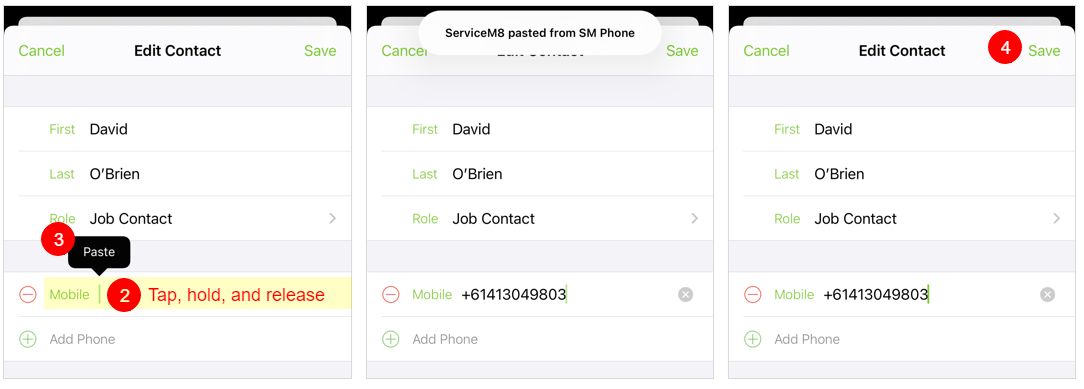
The phone number is now saved to the contact.