

Reports
Average Job Value in the Business Dashboard Report
Learn about average Job Value in the Business Dashboard Report in ServiceM8.
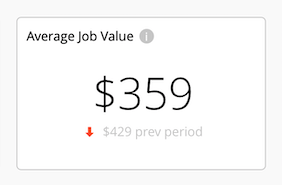
Your Average Job Value in the Business Dashboard is just how it sounds — the average sale value (including any tax) of all Completed jobs during the selected reporting period.
Immediately below is the Average Job Value during the immediately preceding period of equal length, and an arrow indicator as to whether the current reporting period’s figure is higher or lower than the previous reporting period.
Understanding the average value of your jobs helps with fine-tuning your pricing and services. Even small changes can make a big difference to your revenue and growth across the volume of jobs coming through your business.
If you want to increase the value of jobs you complete, below are some tips on relevant ServiceM8 features & other ideas:
Increase Prices
The most obvious option for increasing your average job value is to raise prices. But, which items and services? And by how much? ServiceM8 can’t tell you what to do, but there are various tools and reports which can help your decision-making:
Completed Jobs ‘By Category’ & Revenue ‘By Category’ Reports
The Completed Jobs By Category Report offers a look at the number of jobs Completed each month by Job Category. So, if you categorise jobs according to common characteristics around “job type”, this report can provide insight into the volume of different job types coming through your business. Viewing this in conjunction with the Revenue By Category Report can then help you understand both the volume of certain job types coming through the business, and what role they play in your overall revenue.
Ensure you’ve created considered Job Categories, they’re set in your Job Templates, and your team is diligent in assigning new jobs to the appropriate Job Category.
Learn more about ServiceM8 Reports, and check out Custom Reports for additional options to view and segment your revenue.
Materials Usage Report
The Materials Usage Report shows the most-used Materials & Services across your jobs over a specified date range, and can be additionally segmented by individual staff members and Job Categories. This report offers insight into the quantity of specific billable items being charged across all jobs, and the role these most-used Materials & Service play in your overall revenue.
Learn more about ServiceM8 Reports.
Value-add to your Services
Look at ways you can value-add to your core services to increase their perceived value to customers, set your business’s services apart, and warrant a higher price. There are various ServiceM8 features which might help with this — you could:
- Use the Forms Add-on to provide the client with a certificate or report.
- Use the Asset Management Add-on to provide a report of all assets/equipment serviced on site and an online Asset Portal per asset for clients to report any issues to your business.
- Offer a complimentary check-up 3 or 6 months after job completion, using a reminder with the Recurring Jobs & Reminders Add-on.
- Guarantee booking times and use Booking Reminders with the Automation Add-on, On-the-Way texts and Track My Arrival to keep clients informed of your progress to their job location.
- Offer guarantees or warranties, which can be recorded by creating custom Badges and applying these to the job card.
Upsell and Cross-sell your Services
When it comes to your business, you are the expert — clients don’t know what they don’t know, and they don’t know all the things you can do for them. Look at ways you can offer more value and better service to clients while increasing job value by making them aware of the related products or services you offer:
- Cross-sell: when a client is after Service A, ensure your team make them aware of related Services B & C which complement Service A. Make this a checklist item in job templates when quoting common job types.
- Upsell: when a client is after a quote for Product X, make them aware of their options using Quote Options. Providing “Good, Better, Best” options, where you add value by adding complementary services, or by using higher quality products, helps educate clients around their options and what you can do for them.
Capture Job-Specific Purchases
Ensure you’re charging for all materials used on jobs, and take the time to consider the pricing of smaller items and consumables — across the number of jobs coming through your business, it all adds up!
And when your team makes specific, one-off purchases for a job from one of your suppliers, ensure everything is captured and billed. The Supplier Invoice Import Add-on can help here, by automatically importing supplier invoices directly into the relevant job card in your ServiceM8 account.