

Recurring Jobs and Reminders
How the Recurring Jobs Auto-Routing Add-on works
Learn about how the Recurring Jobs Auto-Routing Add-on works in ServiceM8.
If recurring work is a major part of your business, route optimisation can make a huge difference to your efficiency. With the Recurring Jobs Auto-Routing Add-on, you can set ServiceM8 to routinely process and schedule all recurring jobs, automatically. ServiceM8 will review and schedule the job times and staff to optimise efficiency and minimise distance travelled.
The Recurring Jobs Auto-Routing add-on works in conjunction with the Services Add-on. Services can be applied to recurring jobs in the Recurring Job card.
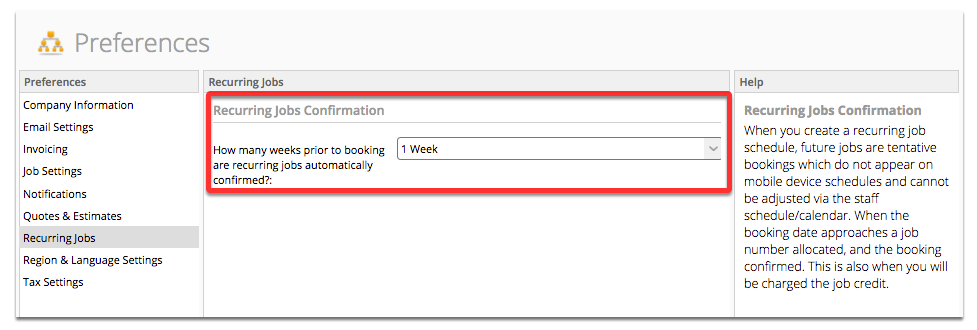
The Recurring Jobs Auto-Routing Add-on can then routinely process and schedule all recurring “Services” jobs, according to the Recurring Job Confirmation timeframe set in Settings > Preferences > Recurring Jobs e.g. if the Recurring Jobs Confirmation timeframe is set at 1 week, on a Monday the Auto-Routing Add-on will review and schedule all recurring “Services” jobs for the following Monday, and schedule the job times and staff to optimise efficiency and minimise distance travelled.
Note: The Recurring Jobs Auto-Routing Add-on will only work with recurring jobs for which a ‘Service’ has been applied (see the Services Add-on for more info on Services). Applying a ‘Service’ is necessary as this is how ServiceM8 knows the job’s duration, and which staff in the business are capable of doing the job, in order to automatically process and schedule the jobs.
First, you will need to activate the Recurring Jobs Auto-Routing Add-on in the ServiceM8 Add-ons page

Ensure that you have configured your Services accordingly

Set how far out you’d like jobs to be automatically scheduled
Click New Recurring Job from the Dispatch Board

Select the Service you want to use for the recurring job

And make sure you set “Automatic” for the Time and Staff Member fields

Then ServiceM8 will automatically schedule recurring ‘Service’ jobs (according to the Recurring Jobs Confirmation timeframe), in the most efficient order, taking into account travel time and staff schedules

Note: Rules and limitations of Recurring jobs Auto-routing:
- The recurring jobs system will never move a job to a date outside its recurrence date (e.g. if it recurrence pattern says the job recurs on 8th of a month, the system will never schedule it for any other day even if “Time” and “Staff” are both set to Automatic)
- When “Time” is set to a specific time (e.g. 9:00AM), the recurring jobs system is locked into that start time and can not assign anything else, even if it would cause double bookings
- When “Staff Member” is set to a specific staff member, the recurring jobs system is locked into that staff member and can not assign anything else, even if it would cause double bookings
- The recurring jobs system has one opportunity to choose the scheduled time/staff of the bookings, and that is when the “unactivated” booking (show in yellow on the schedule) is turned into a real job and is assigned a job number. This happens by default 7 days prior to the booking date, but this can be changed in preferences
When the recurring jobs system activates all the jobs for a particular day it will rearrange all of those jobs into the best time/staff slots it can at that moment, but once that process has completed they will not be moved again. Changing the settings for a recurring job will never have any effect on the jobs that have already been created (the ones shown in the “current” section of the preview window), and adding new recurring jobs will never rearrange existing bookings.