

Asset Management
How to Replace Asset Labels
Learn how to replace Asset Labels in ServiceM8.
If the label on an Asset is damaged or removed, you can replace the label while maintaining the Asset’s details and history.
First, you’ll need to open the Asset details in the ServiceM8 mobile app. Normally the easiest way to do this is to scan the Asset Label, but if the label has been damaged or removed that might not be possible. Instead, first make sure the relevant Asset Badge has been applied to the job you’re working on, and double check that the Job is for the Client (or Site) who owns the Asset.
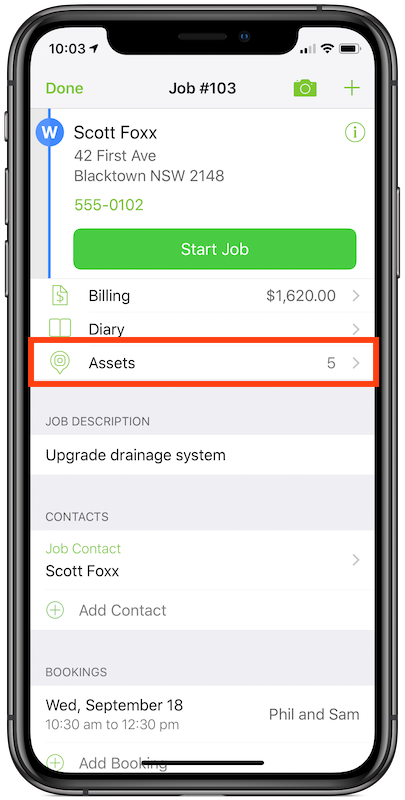
Once you’ve done that, you can tap the Assets menu item in the Job Card to view all Assets for that client.
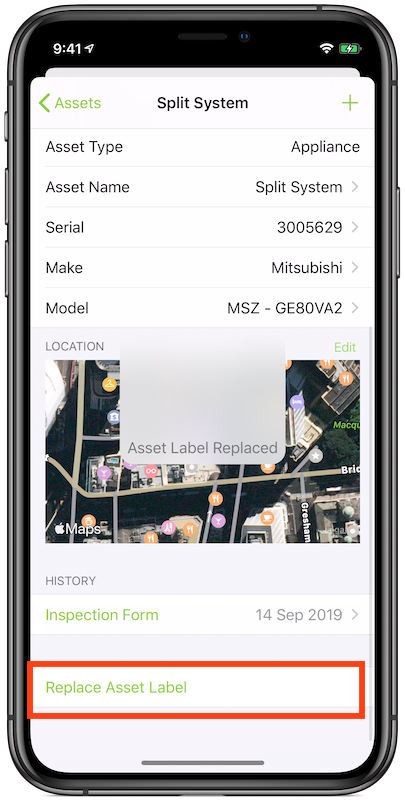
Select the Asset from the list to view its details. Scroll to the bottom and select Replace Asset Label.
You can now apply the new Asset Label to the Asset. Scan it with the camera to save the new Asset Label.
Please note that this feature cannot be used to move labels from one Asset to a different Asset. You must use an Asset Label that has not been previously associated with any other Assets.