Forms
How to capture a client's signature on a Form after review
Learn how to capture a client's signature on a Form after review in ServiceM8.
You can have your customers review a completed form before capturing their signature. To do so, you must set up your form template using the Customer Signature field instead of using a “Signature” type form question. Review How to set up Quote & Form templates for remote signature for more information.
NOTE: This feature only works when completing forms on the ServiceM8 mobile app.
In the field, upon completion of a form:
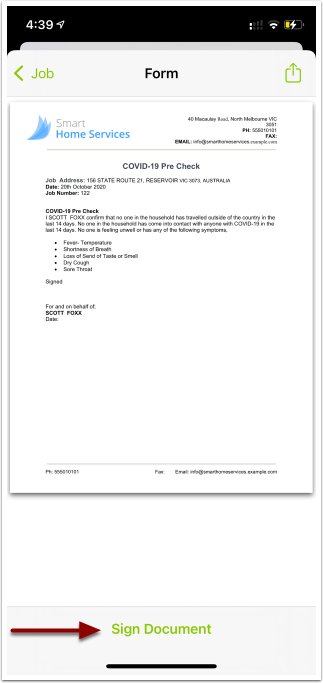
ServiceM8 uses your document template to produce the form PDF, which your client can then review.
- Once the client has read the document, tap Sign Document.
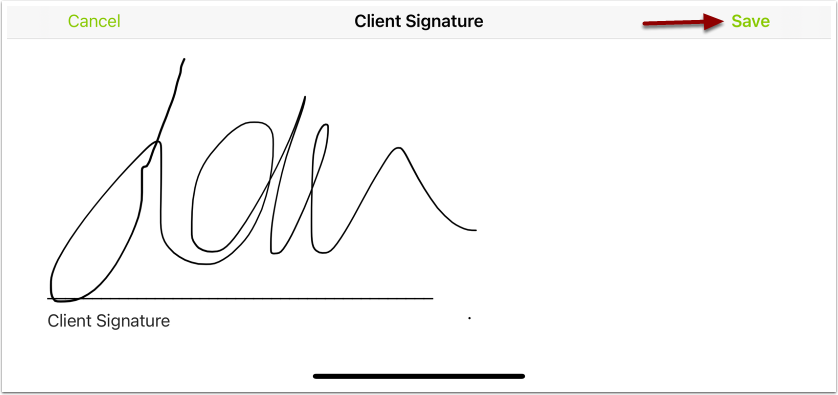
- Ask the client to add their signature.
- Tap Save.
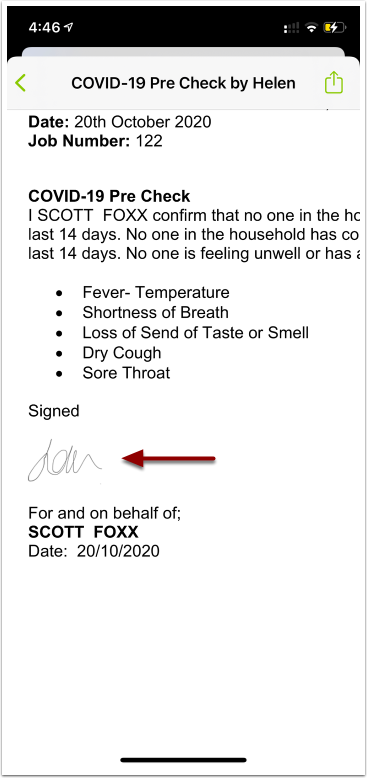
The customer’s signature will be added to the Form PDF document.
The signed PDF will be available on the Job diary to send to the customer or keep on the job for internal use.