

Job queues are virtual folders that let you manage jobs on hold - without losing sight of them. Using queues keeps your standard jobs lists uncluttered, so you can focus on the right jobs at the right time.
This article reviews the two types of job queues, how job queue expiry dates work, and provides links to other relevant articles.
NOTE: You can see jobs in, and send jobs to, queues from both the Online Dashboard and the ServiceM8 mobile app.
Types of Job Queues
There are two types of job queues:-
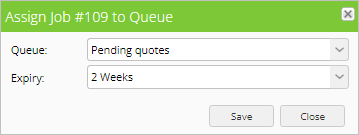
Regular queues, which hold jobs waiting on an external action before work can progress. For example, you may be waiting for a part to arrive, or for a client to respond to a quote.
- Default queues in ServiceM8 are Parts on Order, Pending Quotes, and Workshop - but you can customize or create any queue you’d like.
-
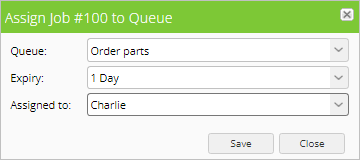
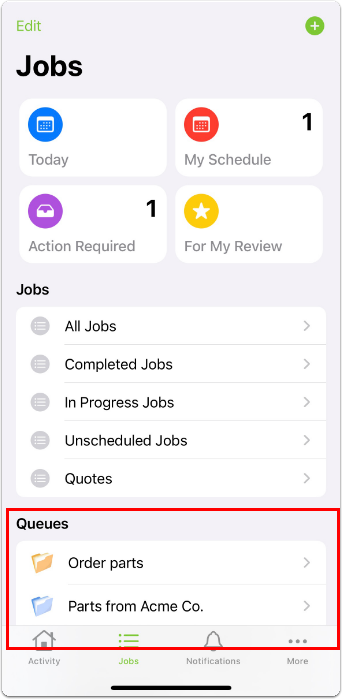
Assignable queues, which hold jobs waiting on an internal action before work can progress. For example, you may need to place an order for a specific part for a job, or for a staff member to send a quote to a client.
- Assignable queues are assigned to a specific staff member for completion within a specific time.
- Jobs assigned to a staff member in an assignable queue will appear in that staff member’s For My Review jobs list, and they will also receive a notification.

Job queue expiry dates
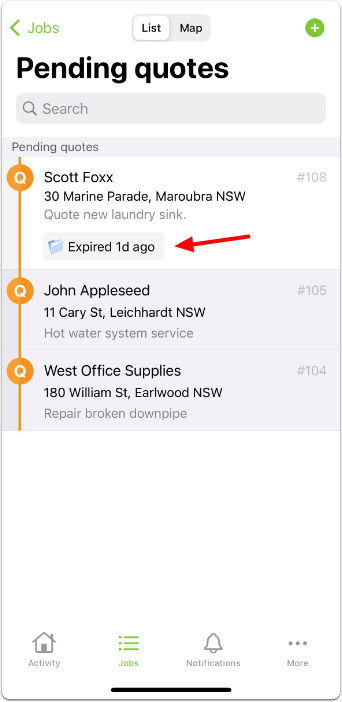
All jobs in queues have expiry dates. If a job is still in a queue on the expiry date, it is flagged for review in the Queues view on the Dispatch Board. It also automatically appears in the Action Required and Unscheduled jobs lists for further action, which can be seen on both the Online Dashboard and the ServiceM8 mobile app. In the example below, Job #108 is in the Pending Quotes queue past the expiry date. It is flagged in the Queues view on the Dispatch Board, and can be seen in the Action Required jobs list. The same expired job is also flagged and highlighted with a lighter background in the queue on the ServiceM8 mobile app.
- If the part arrives earlier, the job can be removed from the queue and scheduled as usual.
- If the part has not arrived by the third day, then the job is flagged in the queue and appears in the Action Required list, prompting you to take action (such as following up with the supplier).
